Friday, November 30, 2018

Installation of GoldenGate Monitoring Agent 12.2


      Oracle GoldenGate Monitor is used to monitor the status of the Goldengate targets like Manager, Extract and Replicat from Oracle Enterprise Manager. Download Oracle GoldenGate Monitor 12.2.1.2.0 from OTN site, you even need minimum java version 8 (1.8) to have Oracle GoldenGate Monitor installed using Oracle Universal Install. For installing Oracle Golden gate 12c (http://sajidkhadarabad.blogspot.com/2016/03/install-oracle-golden-gate-12c.html

You can install Oracle GoldenGate Monitor by Oracle Universal Install or through a silent install. I chose Oracle Universal Install and below are the steps for the install.


Sajidserver01:oracle$ ls -ltr

-r-xr-xr-x 1 oracle oinstall 430387063 Oct 14 04:33 fmw_12.2.1.2.0_ogg.jar
-rwxr-xr-x 1 oracle oinstall 430166267 Mar 17 15:30 fmw_12.2.1.2.0_ogg_Disk1_1of1.zip

Sajidserver01:oracle$ java -jar -Xmx1024m /usr/oracle/gg12c/stage/fmw_12.2.1.2.0_ogg.jar

Launcher log file is /tmp/OraInstall2018-11-16_12-43-53PM/launcher2018-11-16_12-43-53PM.log.
Extracting files.....
Starting Oracle Universal Installer

Checking if CPU speed is above 300 MHz.   Actual 2400.000 MHz    Passed

Checking monitor: must be configured to display at least 256 colors.   Actual 16777216    Passed
Checking swap space: must be greater than 512 MB.   Actual 16383 MB    Passed
Checking if this platform requires a 64-bit JVM.   Actual 64    Passed (64-bit not required)
Checking temp space: must be greater than 300 MB.   Actual 65485 MB    Passed

Preparing to launch the Oracle Universal Installer from /tmp/OraInstall2018-11-16_12-43-53PM

Log: /tmp/OraInstall2018-11-16_12-43-53PM/install2018-11-16_12-43-53PM.log
Logs are located here: /tmp/OraInstall2018-11-16_12-43-53PM.


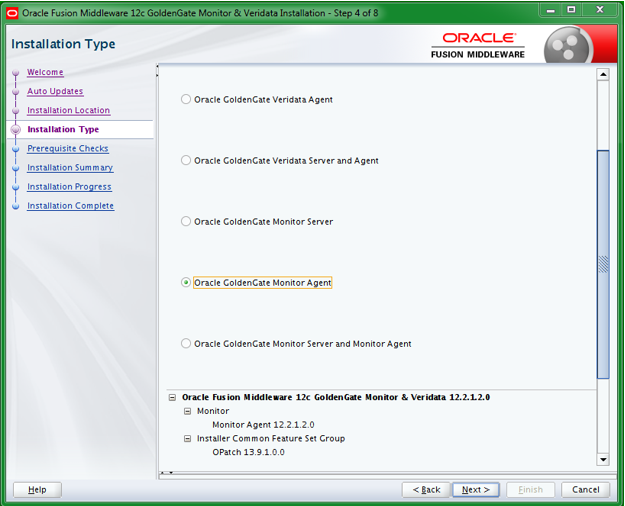
Feed in the location where you want to have monitoring agent installed and make sure to create the directory earlier.



Oracle GoldenGate Monitor is successfully installed!!!

Wednesday, October 31, 2018

TFA-00104 TFA-00002 Oracle Trace File Analyzer (TFA) is not running


                   Oracle Trace File Analyzer (TFA) is a one-stop tool to diagnose all of your system. You can download latest TFA from (Doc ID 1513912.1). I was working on upgrading TFA from 18.1.1 to 18.3.3. Before upgrade TFA was up and running in a healthy state, once I have invoked upgrade happen to run into issues TFA-00104 and TFA-00002, below is the fix for it.


Everytime it will be different error across each server, even though the file exists on the server with right permissions.

ERROR: /usr/tfa/sajidserver02/tfa_home/internal/.pidfile does not exists
ERROR: /usr/tfa/sajidserver02/tfa_home/internal/cached_kv.out does not exists

TFA-00104 Cannot establish connection with TFA Server. Please check TFA Certificates
TFA-00002 Oracle Trace File Analyzer (TFA) is not running


Take it easy as its just a tool, we can directly opt for the new install. Below are the steps which I have performed on the server.


Successfully done with TFA install."Happy Analysing".

Note:
You can check version with using below command:
[root@sajidserver01 bin]# ./tfactl print status

.--------------------------------------------------------------------------------------------------.
| Host     | Status of TFA | PID   | Port | Version    | Build ID             | Inventory Status   |
+----------+---------------+-------+------+------------+----------------------+--------------------+
|sajidsrv01| RUNNING       | 27385 | 5000 | 18.3.3.0.0 | 18330020181005054218 | COMPLETE           |
'----------+---------------+-------+------+------------+----------------------+--------------------'


Friday, September 28, 2018

Validate Database 12c Data Guard


                   Switchover and failover using dgmgrl earlier in 11g, was able to provide an ample amount of information. But with 12c version Oracle introduced a new procedure validate database, which helps to provide DBA with lots of information related to pre- switchover/failover tasks.


                  Managed by Clusterware is added in 12cR2, which was not available in earlier 12CR1. Similarly Automatic Diagnostic 
Repository Errors is removed in 12cR2 which was available earlier in 12cR1. Few more parameter are added, it's difficult to get into nitty-gritty details about each and every property. All in all great job done by Oracle savvy engineers to pinpoint specifics related to pre-switchover tasks.

I happen to test it and run it across 12.2.0.1.0 database.


                 Even though we do get a detailed information prior to hand before the switchover. Database alert log and dataguard alert log will come to rescue at the time of database switchover or failover task.


Friday, August 31, 2018

Deinstall 12.2 Grid Infratructure

                    Last month I have updated the blog with deinstall 12c database (http://sajidkhadarabad.blogspot.com/2018/07/deinstall-12c-database.html), today lets see how we can deinstall grid infrastructure 12.2.0.1. It is imperative to clean the grid software properly, if you are trying to install the new grid software on the existing machine, if not you will be seeing more discrepancies with the new install.

      Let's start working on the process, make sure you set your environment profiles right. I am performing this on a two node RAC cluster, make sure you read and answer the prompts right.


[grid@sajidserver01 deinstall]$ pwd
/usr/12.2/grid/deinstall
[grid@sajidserver01 deinstall]$ ls -ltr
-rwxr-x--- 1 grid oinstall 11313 Jun 18 15:56 deinstall


The deconfig command below can be executed in parallel on all the remote nodes. 

Execute the command on  the local node after the execution completes on all the remote nodes.

Run the following command as the root user or the administrator on node "sajidserver02".

/usr/12.2/grid/crs/install/rootcrs.sh -force -deconfig -paramfile "/tmp/deinstall2018-06-22_12-29-38PM/response/deinstall_OraGI12Home1.rsp"

Run the following command as the root user or the administrator on node "sajidserver01".

/usr/12.2/grid/crs/install/rootcrs.sh -force  -deconfig -paramfile "/tmp/deinstall2018-06-22_12-29-38PM/response/deinstall_OraGI12Home1.rsp" -lastnode

Press Enter after you finish running the above commands


 It will deinstall the software but the directories will still be existing across all the nodes. Which you need to manually delete.


Deinstall 12c Database

I will be discussing on deinstalling the 12c database, if you would like to drop the database check this (http://sajidkhadarabad.blogspot.com/2016/06/delete-or-drop-oracle-database-12c.html). Make sure you set your Oracle database profiles properly. This one is particularly for 12cR2 RAC database, the process will be the same for even 12cR1 and 11G databases.

[oracle@sajidserver01 deinstall]$ pwd
/usr/oracle/product/12.2/deinstall
[oracle@sajidserver deinstall]$ ls -ltr deinstall
-rwxr-x--- 1 oracle oinstall 11323 Jul 19 11:59 deinstall

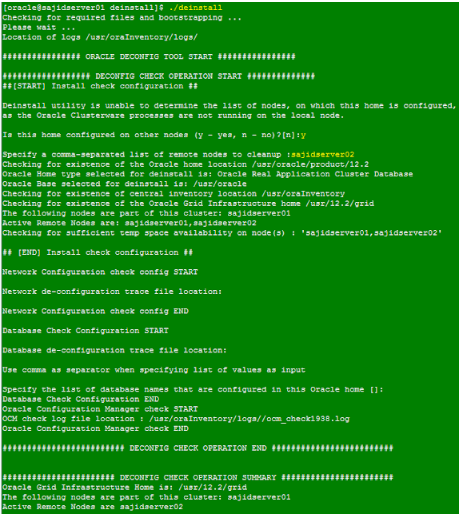
In the below screenshot, it will ask you to feed in the details after few steps. I have highlighted them for easy understanding.


It will deinstall the software but the directories will still be existing across all the nodes. Which you need to manually delete.


Friday, May 18, 2018

OMS Responding Slow 13c

           OMS 13c was responding slow, happen to hear the same complaint from fellow DBA's. I was like, I wish there was some turbo or magic button to make it fast, jokes aside. Started drilling down into logs, happen to find strange errors from the OMS alert logs as mentioned below:

Look up for SIGTERM in the alert log, to be more specific it is signal termination.


####
Fix:
####
[oracle@sajidserver ohs1]$ pwd
$OMS_HOME/gc_inst/user_projects/domains/GCDomain/config/fmwconfig/components/OHS/ohs1

Take the backup of the file.
[oracle@sajidserver ohs1]$cp httpd.conf httpd.bkp_date

[oracle@sajidserver ohs1]$ vi httpd.conf

look for mpm_prefork_module and mpm_worker_module, they will look like below. 


Change the highlighted line in yellow to /u01/locks. Make sure you have created the locks directory in /u01 with oracle account and 775 permissions.  Save the changes and exit the file.

Last and final step bounce the OMS.

[oracle@sajidserver logs]$ emctl stop oms -all
[oracle@sajidserver logs]$ emctl start oms

I have seen the OMS was responding fast enough. I happen to go through Oracle Metalink note (Doc ID 2117861.1), the same fix even works for OMS 12c too. Hope it will be even helpful to you folks too.

Sunday, April 22, 2018

IOUG Conference 2018 Vegas

              Here am Vegas, early morning 5 AM, super excited to know tons of new things related to Oracle, Artificial Intelligence, AWS, Google Cloud Platform and many more new technologies. Praise to Lord and heartily thanks to American Eagle Outfitters.


Friday, March 2, 2018

Emocmrsp is missing in Opatch utility (12cR2)


                  Emocmrsp was available under $ORACLE_HOME/OPatch/ocm/bin in 12cR1 and 11G databases. It is deprecated now in new Opatch 12cR2. It is discussed in Oracle metalink notes (Doc ID 1591616.1).


                When I have downloaded the latest p6880880_122010_Linux-x86-64.zip and applied it, there was no emocmrsp file. The best part is, you don't need to generate it anymore and at the same time do not even need to add a tail to your opatchauto apply command.


The new feature of the Opatch utility 12cR2 gives you a clear description of OPatchauto session completed and time taken to complete the session like below:


OPatchauto session completed at Fri Mar  2 12:07:08 2018
Time is taken to complete the session 1 minute, 36 seconds

Happy Patching and learning :).

Thursday, October 19, 2017

Postgres psql: could not connect to server error


Would like to share postgres error , which I happen to notice on psql (9.2). It is sort of weird and I was not able to initiate any database connections.

psql: could not connect to server: No such file or directory
Is the server running locally and accepting
connections on Unix domain socket "/var/run/postgresql/.s.PGSQL.5432"?

I happened to check database was down.

[root@sajidserver ~]# ps -ef|grep pg
root       4152   4238  0 12:43 pts/2    00:00:00 grep --color=auto pg

####
 Fix:
####

[root@sajidserver ~]$ cd /u01/pgsql/data
[root@sajidserver ~]$ cp postmaster.pid postmaster.pid.bkp
[root@sajidserver ~]$ rm postmaster.pid

Sweet and cool to see DB is back up and running

[root@sajidserver ~]# ps -ef|grep pg
root       4152   4238  0 13:43 pts/2    00:00:00 grep --color=auto pg
postgres  21453      1  0 oct19 ?        00:01:00 postgres -D /u01/pgsql/data

Friday, April 28, 2017

How to Install Oracle Enterprise Manager Cloud Control 13c Release 2 (13.2.0.0) Installation on Oracle Linux 6


          In the next few minutes,I will be discussing about the installing Oracle Enterprise Manager Cloud Control 13c Release 2 (13.2.0.0) Installation on Oracle Enterprise Linux 6 . OEM makes the life of DBA or DMA much easier. You need to have the appropriate Linux OS packages, kernel parameters and database parameters to be in place.  First you need to install the repository database, for step by step instructions to install 12c database you can follow ( http://sajidkhadarabad.blogspot.com/2015/09/12c-database-install-with-screenshots.html )

Once you are done with the repository installation. Lets proceed with Oracle Enterprise Manager installation.


[oracle@sajidserver oracle]$ mkdir -p /usr/app/oracle/oms13c
[oracle@sajidserver oracle]$ mkdir -p /usr/app/oracle/agent13c
[oracle@sajidserver oracle]$ mkdir -p /usr/app/oracle/oms13c/swlib

[oracle@sajidserver oracle]$ chmod 775 -R oms13c agent13c

[oracle@sajidserver stage]$ ./em13200_linux64.bin


It will check for all the repository pre-requisites


Provide the credentials and keep them recorded. If not you can even change it later as you needed. You need to have the right host name and database name.


Make sure if you database is RAC, you have the connect string provided right here


It will check for pre-requisites in repository database. Provide the software library location here /usr/app/oracle/oms13c/swlib. If you want to enable BI publisher you can select that here and by any chance if it is RAC it is recommended to keep it on a shared drive.


At this point you are done with installation of  Oracle Enterprise Manager Cloud Control 13c Release 2 (13.2.0.0) on Oracle Linux 6

Tuesday, March 21, 2017

OMS responded illegally [ERROR- Failed to Update Target Type Metadata] in 13cR2


                       I have been working on applying latest February patches to 13cR2 oem agents recently. Once the oem agents are patched successfully, When I was checking status of the agent happen to find out Heartbeat status shows up error OMS responded illegally [ERROR- Failed to Update Target Type Metadata] in 13cR2.


[oracle@Sajidserver ~]$ emctl status agent

Oracle Enterprise Manager Cloud Control 13c Release 2
Copyright (c) 1996, 2016 Oracle Corporation.  All rights reserved.
---------------------------------------------------------------

Last successful upload                       : (none)

Last attempted upload                        : (none)
Total Megabytes of XML files uploaded so far : 0
Number of XML files pending upload           : 290
Size of XML files pending upload(MB)         : 4.47
Available disk space on upload filesystem    : 42.52%
Collection Status                            : Collections enabled
Heartbeat Status       : OMS responded illegally [ERROR- Failed to Update Target Type Metadata]
Last attempted heartbeat to OMS              : 2017-03-21 15:11:37
Last successful heartbeat to OMS             : (none)
Next scheduled heartbeat to OMS              : 2017-03-21 15:12:07


Solution:


1. Stop the oem agents (emctl stop agent)
2. Rollback the oem agent psu or any plugin patches applied 
    (opatch rollback -id 25414194)
3. Start the agents (emctl start agent)
4. Check agent status  (emctl status agent)


Monday, November 14, 2016

Enable Archivelog Mode Oracle 12c RAC Database


I was working on enabling archivelog mode on Oracle Rac 12c database. You can follow below step by step procedure. If you even want to look at disabling archive log mode click on the link( Disable Archivelog Mode Oracle 12c RAC Database).

[oracle@Sajidserver1~]$srvctl status database -d SAJIDDB
Instance SAJIDDB1 is running on node Sajidserver1
Instance SAJIDDB2 is running on node Sajidserver2


[oracle@Sajidserver1 ~]$ sqlplus / as sysdba

SYS@SAJIDDB1>alter system set cluster_database=false scope=spfile sid='*';

System altered.

SYS@SAJIDDB1>exit


[oracle@Sajidserver1 ~]$ srvctl stop database -d SAJIDDB -o immediate

[oracle@Sajidserver1 ~]$ sqlplus / as sysdba

SYS@SAJIDDB1>startup mount;
ORACLE instance started.

Database mounted.

SYS@SAJIDDB1>archive log list;
Database log mode              No Archive Mode
Automatic archival             Enabled
Archive destination            +FLASHDG
Oldest online log sequence     1221
Next log sequence to archive   1222
Current log sequence           1222


SYS@SAJIDDB1>ALTER DATABASE ARCHIVELOG;

Database altered.

SYS@SAJIDDB1>alter system set cluster_database=true scope=spfile sid='*';

System altered.

SYS@SAJIDDB1>shutdown immediate;
ORA-01109: database not open

Database dismounted.
ORACLE instance shut down.

SYS@SAJIDDB1>exit

[oracle@Sajidserver1 ~]$ srvctl start database -d SAJIDDB

[oracle@Sajidserver1 ~]$ sqlplus / as sysdba

SYS@SAJIDDB1>archive log list;
Database log mode              Archive Mode
Automatic archival             Enabled
Archive destination            +FLASHDG
Oldest online log sequence     1228
Current log sequence           1229

SYS@SAJIDDB1>exit


[oracle@Sajidserver1 ~]$ srvctl status database -d SAJIDDB
Instance SAJIDDB1 is running on node Sajidserver1
Instance SAJIDDB2 is running on node Sajidserver2

Thursday, October 27, 2016

Disable Archivelog Mode Oracle 12c RAC Database

I was working on very basic DBA task to disable the archive log mode in oracle 12c RAC DATABASE, below  is the step by step procedure.

[oracle@Sajidserver1~]$srvctl status database -d SAJIDDB
Instance SAJIDDB1 is running on node Sajidserver1
Instance SAJIDDB2 is running on node Sajidserver2


[oracle@Sajidserver1 ~]$ sqlplus / as sysdba

SYS@SAJIDDB1>alter system set cluster_database=false scope=spfile sid='*';

System altered.

SYS@SAJIDDB1>exit

[oracle@Sajidserver1 ~]$ srvctl stop database -d SAJIDDB -o immediate

[oracle@Sajidserver1 ~]$ sqlplus / as sysdba

SYS@SAJIDDB1>startup mount;
ORACLE instance started.

Database mounted.

SYS@SAJIDDB1>archive log list;
Database log mode              Archive Mode
Automatic archival             Enabled
Archive destination            +FLASHDG
Oldest online log sequence     25
Next log sequence to archive   0
Current log sequence           26


SYS@SAJIDDB1>ALTER DATABASE NOARCHIVELOG;

Database altered.

SYS@SAJIDDB1>alter system set cluster_database=true scope=spfile sid='*';

System altered.

SYS@SAJIDDB1>shutdown immediate;
ORA-01109: database not open

Database dismounted.
ORACLE instance shut down.

SYS@SAJIDDB1>exit

[oracle@Sajidserver1 ~]$ srvctl start database -d SAJIDDB

[oracle@Sajidserver1 ~]$ sqlplus / as sysdba


SYS@SAJIDDB1>archive log list;
Database log mode              No Archive Mode
Automatic archival             Disabled
Archive destination            +FLASHDG
Oldest online log sequence     26
Current log sequence           27

SYS@SAJIDDB1>exit


[oracle@Sajidserver1 ~]$ srvctl status database -d SAJIDDB
Instance SAJIDDB1 is running on node Sajidserver1
Instance SAJIDDB2 is running on node Sajidserver2

#########
Issues:
#########

1. You need to set cluster_database parameter from container database. If not you will see below error:

SYS@SAJIDDB1>alter session set container=sajid_pdb;
SYS@SAJIDDB1>alter system set cluster_database=false scope=spfile sid='*';
alter system set cluster_database=false scope=spfile sid='*'
*
ERROR at line 1:
ORA-65040: operation not allowed from within a pluggable database

2. Be prepared to drop any retore points to disable archive log.

SYS@SAJIDDB1>alter database noarchivelog;
alter database noarchivelog
*
ERROR at line 1:
ORA-38781: cannot disable media recovery - have guaranteed restore points

SYS@SAJIDDB1>SELECT name, guarantee_flashback_database, scn FROM v$restore_point;

SYS@SAJIDDB1>drop restore point <Restore_Point_Name>;

Restore point dropped.

SYS@SAJIDDB1>ALTER DATABASE FLASHBACK OFF;

Database altered.


Wednesday, September 28, 2016

Applying PSU 12.1.0.2.160719 (Jul2016) for GI and DB Oracle RAC

I was installing the latest Oracle PSU 12.1.0.2.160719 (Jul2016) on 3 node cluster and happen to run into below issues. Do refer the readme file before executing the PSU.


If you need further in details do refer to Apply the latest PSU5 for 12.1.0.2 RAC Database
(http://sajidkhadarabad.blogspot.com/2015/08/apply-latest-psu5-for-12102-rac-database.html) (Scroll down) in my blog .

##############
Issue 1
##############

1. Permission Issue

Applying patch(es) to "/usr/12c/grid" ...
Command "/usr/12c/grid/OPatch/opatch napply -phBaseFile /tmp/OraGI12Home1_grid_patchList -local  -invPtrLoc /usr/12c/grid/oraInst.loc -oh /usr/12c/grid -silent -ocmrf /usr/12c/grid/OPatch/ocm/bin/ocm.rsp" execution failed:
UtilSession failed:
Prerequisite check "CheckApplicable" failed.

Log file Location for the failed command: /usr/12c/grid/cfgtoollogs/opatch/opatch.log

For more details, please refer to the log file "/usr/12c/grid/cfgtoollogs/opatchauto/23273629/opatch.debug.log".

Apply Summary:
Following patch(es) are successfully installed:
DB Home: /usr/oracle/product/12c:

opatchauto ran into some warnings during patch installation (Please see log file for details):
DB Home: /usr/oracle/product/12c: 23054246,23054327

Following patch(es) failed to be installed:
GI Home: /usr/12c/grid: 21436941,23054246,23054327,23054341
Command failure exception

opatchauto failed with error code 2.


Looked in to the log specifications and edited the permission for dropdb.pl from oracle:oinstall to grid:oinstall and run the opatchauto resume.

[root@SajidServer OPatch]# ./opatchauto resume

Have a cup of coffee, till that time it will be completed.


OPatch Automation Tool
Copyright (c)2014, Oracle Corporation. All rights reserved.

OPatchauto Version : 12.1.
OUI Version        : 12.1.
Running from       : /usr/grid

OPatchauto will attempt to resume the last run session. This might take several minutes...

opatchauto log file: /usr/grid/cfgtoollogs/opatchauto/23273629/opatch.deploy.log

Executing command:
/usr/grid/OPatch/opatch napply -phBaseFile /tmp/OraGI12Home1_grid -local  -invPtrLoc /usr/grid/oraInst.loc -oh /usr/grid -silent -ocmrf /usr/grid/OPatch/ocm/bin/ocm.rsp
 as owner "grid"
... above command successful.

Executing command:
/usr/grid/rdbms/install/rootadd_rdbms.sh
 as owner "root"
... above command successful.


OPatchauto was able to resume from the previous patching session and complete successfully.

opatchauto succeeded.

#############
Issue 2
#############

2. Once Patching is completed Listener status will be down in OEM, even if you try to start them manually on the server it will fail with below error.

lsnrctl start listener

LSNRCTL for Linux: Version 12.1.0.2.0 - Production on 28-SEP-2016 02:15:55

Copyright (c) 1991, 2014, Oracle. All rights reserved.

Starting /usr/grid/bin/tnslsnr: please wait...

TNS-12537: TNS:connection closed
TNS-12560: TNS:protocol adapter error
TNS-00507: Connection closed
Linux Error: 29: Illegal seek <<<< here


Update your listener.ora file across all the nodes and bounce the listener on which you are facing the issue.

CRS_NOTIFICATION_LISTENER=OFF
CRS_NOTIFICATION_LISTENER_SCAN1=OFF
CRS_NOTIFICATION_LISTENER_SCAN2=OFF
CRS_NOTIFICATION_LISTENER_SCAN3=OFF

lsnrctl start listener from Grid home.

This has been fixed in Oct2016 12.1.0.2.161018 patch. Please follow Oracle Doc ID (2171506.1).

Friday, August 5, 2016

Moving ASM FILES between remote ASM instance by ASMCMD

We were working on database duplication for standby to copy the ASM related files from one cluster to other and encountered few issues. I first encountered it on 12c related to ASM file copy, asmcmd remote copy works through listener connection. ASMCMD remote connection can fail with below generic error.

1. Sysasm remote connection does not work. 
2. Incorrect password given for asmsnmp user. 
3. Remote ASM Instance password file missing.
4. Not able to reach remote host. 
5. Remote host listener is down. 
6. Remote ASM Instance is not registered with listener and running non-default port.

I have faced the below issue:

ASMCMD> cp +TESTDG/<DB_NAME>/t_435129223.143.435129224 asmsnmp/<pwd>@NODE1+asm1:+TESTDG/<DB_NAME>/t_435129223.143
ASMCMD-8201: (Bad argc for RDBMS:ASMCMD-8201).

[8201] means unable to connect remote ASM Instance. 

It can even raise,

ASMCMD> cp +TESTDG/<DB_NAME>/t_435129223.143.435129224 asmsnmp/<pwd>@NODE1+asm1:+TESTDG/<DB_NAME>/t_435129223.143

ASMCMD-8016: copy source '+TESTDG/<DB_NAME>/t_435129223.143.435129224' and target '+TESTDG/<DB_NAME>/t_435129223.143' failed
ORA-17628: Oracle error 19505 returned by remote Oracle server
ORA-19505: failed to identify file ""
ORA-06512: at "SYS.X$DBMS_DISKGROUP", line 486
ORA-06512: at line 3 (DBD ERROR: OCIStmtExecute)

Solution:

select * from v$pwfile_users;

grant sysasm to asmsnmp;