Friday, October 30, 2015

How to Increase or Add Redo Log Files in RAC Environment


Sometime DBA'S need to work on the task to increase the size of the redologs based on requirement of more data being pushed on. The procedure remain the same if you working on RAC environment for ODA'S and EXADATA machines the slightest difference you will be looking is some varied diskgroup names DATA, RECO and DBFS.

#####################
Script to check Redo logs
#####################
spool redologs.txt
set echo off
set feedback off
set linesize 120
set pagesize 35
set trim on
set trims on
set lines 120
col group# format 999
col thread# format 999
col member format a70 wrap
col status format a10
col archived format a10
col fsize format 999 heading "Size (MB)"

select l.group#, l.thread#,
f.member,
l.archived,
l.status,
(bytes/1024/1024) fsize
from
v$log l, v$logfile f
where f.group# = l.group#
order by 1,2
/
spool off

################
Output of the script
################

GROUP# THREAD# MEMBER                              ARCHIVED   STATUS     Size (MB)
------ ------- ---------------------------------- ---------- ---------- ---------
     1       1 +DG1/<DB Name>/ONLINELOG/group_1    YES        INACTIVE         100
     1       1 +DG2/<DB Name>/ONLINELOG/group_1    YES        INACTIVE         100
     2       1 +DG1/<DB Name>/ONLINELOG/group_2    YES        INACTIVE         100
     2       1 +DG2/<DB Name>/ONLINELOG/group_2    YES        INACTIVE         100
     3       2 +DG1/<DB Name>/ONLINELOG/group_3    NO         CURRENT          100
     3       2 +DG2/<DB Name>/ONLINELOG/group_3    NO         CURRENT          100
     4       2 +DG1/<DB Name>/ONLINELOG/group_4    YES        UNUSED           100
     4       2 +DG2/<DB Name>/ONLINELOG/group_4    YES        UNUSED           100
     5       3 +DG1/<DB Name>/ONLINELOG/group_5    YES        UNUSED           100
     5       3 +DG2/<DB Name>/ONLINELOG/group_5    YES        UNUSED           100
     6       3 +DG1/<DB Name>/ONLINELOG/group_6    YES        UNUSED           100
     6       3 +DG2/<DB Name>/ONLINELOG/group_6    YES        UNUSED           100

#############
Add Redo Logs
#############

First Add or Resize the redo logs depending on your requirement . You can drop the redologs later, once the addition is done.

alter database add logfile thread 1 group 7 ('+DG1','+DG2') size  250M;
alter database add logfile thread 1 group 8 ('+DG1','+DG2') size  250M;
alter database add logfile thread 2 group 9 ('+DG1','+DG2') size  250M;
alter database add logfile thread 2 group 10 ('+DG1','+DG2') size  250M;
alter database add logfile thread 3 group 11 ('+DG1','+DG2') size  250M;
alter database add logfile thread 3 group 12 ('+DG1','+DG2') size  250M;

###########
Log Switch
###########

Do the log switch to and ensure the status is in INACTIVE state before you drop the redo logs. Use the below commannds to change the state of logfiles.

alter system switch logfile;
alter system checkpoint;
alter system checkpoint global;


Once you find the logfile in INACTIVE state drop them using the below command:
ex: alter database drop logfile group 1;   =====> Whichever is in INACTIVE state.

#############
Desired Result
#############

Use the same script mentioned above to crosscheck your output

GROUP# THREAD# MEMBER                              ARCHIVED   STATUS     Size (MB)
------ ------- ---------------------------------- ---------- ---------- ---------
     7       1 +DG1/<DB Name>/ONLINELOG/group_7     YES        INACTIVE         250
     7       1 +DG2/<DB Name>/ONLINELOG/group_7     YES        INACTIVE         250
     8       1 +DG1/<DB Name>/ONLINELOG/group_8     YES        INACTIVE         250
     8       1 +DG2/<DB Name>/ONLINELOG/group_8     YES        INACTIVE         250
     9       2 +DG1/<DB Name>/ONLINELOG/group_9     NO         CURRENT          250
     9       2 +DG2/<DB Name>/ONLINELOG/group_9     NO         CURRENT          250
    10       2 +DG1/<DB Name>/ONLINELOG/group_10    YES        UNUSED           250
    10       2 +DG2/<DB Name>/ONLINELOG/group_10    YES        UNUSED           250
    11       3 +DG1/<DB Name>/ONLINELOG/group_11    YES        UNUSED           250
    11       3 +DG2/<DB Name>/ONLINELOG/group_11    YES        UNUSED           250
    12       3 +DG1/<DB Name>/ONLINELOG/group_12    YES        UNUSED           250
    12       3 +DG2/<DB Name>/ONLINELOG/group_12    YES        UNUSED           250


You are DONE with Addition and resize of redolog groups.

#############
More Thoughts
#############

You may get through these errors when you are not properly executing the redo logs tasks. These can be ignored.

SYS@<DB Name>1>alter database drop logfile group 7;
alter database drop logfile group 7
*
ERROR at line 1:
ORA-01624: log 7 needed for crash recovery of Name <DB Name> (thread 2)
ORA-00312: online log 7 thread 2: '+DG1/<DB Name>/ONLINELOG/group_7.'
ORA-00312: online log 7 thread 2: '+DG2/<DB Name>/ONLINELOG/group_7.'

SYS@<DB Name>1>
alter database drop logfile group 12;SYS@<DB Name>1>
alter database drop logfile group 12
*
ERROR at line 1:
ORA-01567: dropping log 12 would leave less than 2 log files for <DB Name> <DB Name>3 (thread 3)
ORA-00312: online log 12 thread 3: '+DG1/<DB Name>/ONLINELOG/group_12.'
ORA-00312: online log 12 thread 3: '+DG2/<DB Name>/ONLINELOG/group_12.'

########################
Work Arounds for Errors
########################

PRCR-1079 : Failed to start resource ora.dbname.db
CRS-5017: The resource action "ora.dbname.db start" encountered the following error:
ORA-01618: redo thread 3 is not enabled - cannot mount
. For details refer to "(:CLSN00107:)" in crsd trace file

CRS-2674: Start of 'ora.dbaname.db' on 'node03' failed
CRS-5017: The resource action "ora.dbname.db start" encountered the following error:
ORA-01618: redo thread 4 is not enabled - cannot mount
. For details refer to "(:CLSN00107:)" in crsd trace

SQL> alter database enable public thread 3;

This will resolve the issue. Hurray!!!!!!!!!!


Thursday, September 24, 2015

Oracle 12c Linux client 64 bit step by step install (12.1.0.2)


Create a staging directory on your application server and download the files from OTN. Make sure to set the profiles perfectly for the database and you do have all the directories set with right permissions. Check the RPM’s based on you operating system stipulations.

You can install client based on your requirements below are the install types and space requirements.


Once you log on to the machine

[Sajid@Sajid Server stage]$ ls
linuxamd64_12102_client.zip
[Sajid@Sajid Server stage]$ unzip linuxamd64_12102_client.zip 
[Sajid@Sajid Server stage]$ ls
client
[Sajid@Sajid Server client]$ ls
-rwxrwxr-x  1 oracle oinstall  500 Feb  6  2013 welcome.html
-rwxr-xr-x  1 oracle oinstall 8537 Jul  7  2014 runInstaller
drwxr-xr-x  4 oracle oinstall 4096 Jul  7  2014 install
drwxrwxr-x  2 oracle oinstall 4096 Jul  7  2014 response
drwxr-xr-x 14 oracle oinstall 4096 Jul  7  2014 stage


Select the install method and hit next. Most of the shops opt for Administrator, you can even proceedwith instant client and runtime. If you like to add some custom parameters you need to choose custom as of now I am choosing Adminitrator.


Select language and hit Next


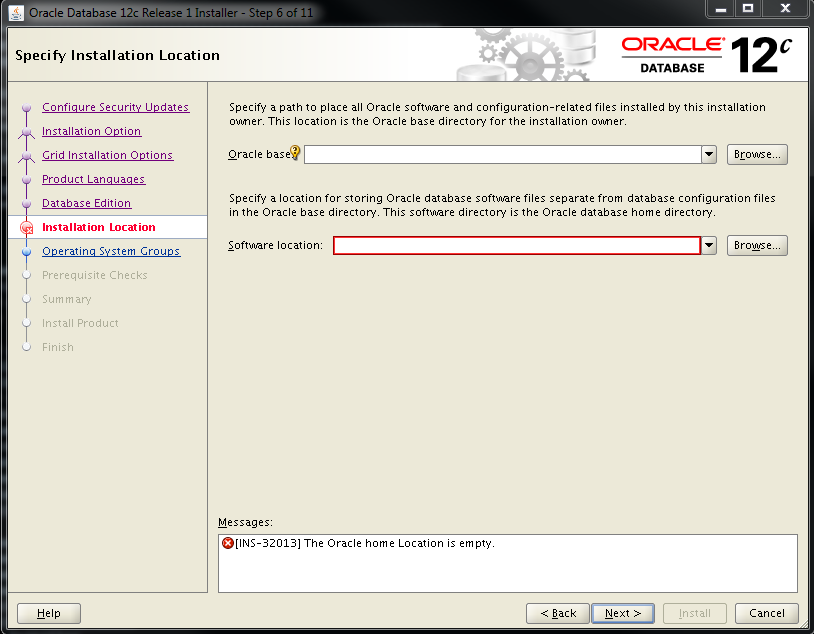
Select appropriate Oracle base and Software location and hit next


Save the response file in case you would like to do silent install for any other fresh installs.


Your client is installed successfully. Update your tnsnames.ora file and test your database connection.

sqlplus username/password@<Server Name>/<DB Name>


The above screen will pop up when you do custom install all the rest of the steps are pretty much similar to Administrator but her you can choose any components based on your requirement.


Tuesday, September 22, 2015

Step by Step Oracle 12c Database Installation with Screenshots (12.1.0.2)

Create a staging directory on your server and download the files from OTN. Make sure to set the profiles perfectly for the database and you do have all the directories set with right permissions. Check the RPM’s based on you operating system stipulations.
p17694377_121020_Linux-x86-64_1of8.zip
p17694377_121020_Linux-x86-64_2of8.zip

[Sajid@SajidServer~]$ cd /u01/stage
[Sajid@SajidServer stage]$ ls -ltr
-rwxrwxr-x 1 oracle oinstall 1673517582 Sep 01 17:04 p17694377_121020_Linux-x86-64_1of8.zip
-rwxrwxr-x 1 oracle oinstall 1014527110 Sep 01 17:04 p17694377_121020_Linux-x86-64_2of8.zip
[Sajid@SajidServer stage]$ unzip p17694377_121020_Linux-x86-64_1of8.zip
[Sajid@SajidServer stage]$ unzip p17694377_121020_Linux-x86-64_2of8.zip
[Sajid@SajidServer stage]$ ls -ltr
-rwxrwxr-x 1 oracle oinstall 1673517582 Sep 01 17:04 p17694377_121020_Linux-x86-64_1of8.zip
-rwxrwxr-x 1 oracle oinstall 1014527110 Sep 01 17:04 p17694377_121020_Linux-x86-64_2of8.zip
drwxrwxr-x 7 oracle oinstall       4096 Jul 01  2014 database
[Sajid@SajidServer stage]$ cd database

Make sure you have your VNC or XMING set up properly and now invoke the runInstaller

[Sajid@SajidServer database]$ ./runInstaller


Untick the box I wish to receive security updates via My Oracle Support

Select Yes and hit Next

Select Install Database Software only

Select Single Instance database installation


Select the language and Hit Next

Select database edition and hit Next

Set the Oracle Base and Software Location as per your shop

Select the group as Oinstall. Look for the Prerequisite check and look for if you want to set at this time and hit next. At this point you will be done with the Software Installation.
Invoke dbca from your server and if the profiles are set properly it will take you to the next screen.

Select Create Database and hit Next


Select Advanced Mode and hit next. You can even go with Create database with default settings depending on your requirement.


Select General Purpose or Transactional Processing and hit Next

Enter the Global Database Name and SID. Check the Create As Container Database and select create a container database with one or more PDBs and enter the PDB name. You can make changes depending upon your requirements and hit Next.


You can Configure Enterprise Manager (EM) Database Express based on your needs and hit Next

You can choose separate passwords or use same passwords and hit Next

Select the Listener Name and Listener Port as per your requirements and hit Next

You can Enable Archiving and even specify Fast Recovery Area based on your prerequisites and hit Next

On Location give the path of your archive log location if you are willing to and hit Ok

You can select sample schemas if not even leave it and hit Next

Set the Memory values based on you specifications after it in the same window select Sizing

Enter the process and hit Character Set

Choose the options on stipulation and hit Connection Mode

Choose an option and now hit Next

Now you can Create Database and even save the template with database creation scripts. Select Customize Storage Settings.


Set the location for Control File and hit Apply


Select Datafiles and hit Apply

Set the Redo logs properly and hit Apply and now hit Next


You can check the Activity log and Alert log for errors


Now your Database is Created.


Tuesday, September 8, 2015

12c User connection ORA-01017 Bug

SYS@Sajid>connect <username>/<password>
ERROR:
ORA-01017: invalid username/password; logon denied
Warning: You are no longer connected to ORACLE.

@>exit

[oracle@Sajidserver01] /home/oracle: sqlplus  as sysdba

SQL*Plus: Release 12.1.0.2.0 Production on Thu Sep 3 11:42:00 2015

Copyright (c) 1982, 2014, Oracle.  All rights reserved.


Connected to:
Oracle Database 12c Enterprise Edition Release 12.1.0.2.0 - 64bit Production
With the Partitioning, Real Application Clusters, Automatic Storage Management, OLAP,
Advanced Analytics and Real Application Testing options

####################
Proper Connect String
####################

SYS@Sajid>connect <username>/<password>@<dbname>;
Connected.
<user>@<dbaname>>show user;
USER is "username"

12c ASMSNMP user creation in RAC

You need ASMSNMP user to configure the targets in Grid Control Monitoring. Below are the step by step creation of ASMSNMP user creation in 12c in RAC.

#########################
Check for the ASMSNMP user
#########################

[grid@Sajidserver01 ~]$ asmcmd

ASMCMD> lspwusr
Username sysdba sysoper sysasm
     SYS   TRUE    TRUE  FALSE


[grid@Sajidserver01 ~]$ sqlplus /as sysasm

SQL*Plus: Release 12.1.0.2.0 Production on Tue Sep 8 10:04:41 2015

Copyright (c) 1982, 2014, Oracle.  All rights reserved.


Connected to:
Oracle Database 12c Enterprise Edition Release 12.1.0.2.0 - 64bit Production
With the Real Application Clusters and Automatic Storage Management options

SYS@+ASM1>select * from v$pwfile_users;

USERNAME                       SYSDB SYSOP SYSAS SYSBA SYSDG SYSKM     CON_ID
------------------------------ ----- ----- ----- ----- ----- ----- ----------
SYS                            TRUE  TRUE  FALSE FALSE FALSE FALSE          0


#############################
Create pwd file in grid home
#############################
[grid@Sajidserver01 ~]$ cd $ORACLE_HOME/dbs
{grid@Sajidserver01 dbs]$ pwd
/usr/app/12.1.0/grid/dbs
[grid@Sajidserver01 dbs]$ ls -ltr

[grid@Sajidserver01 dbs]$ orapwd file=/usr/app/12.1.0/grid/dbs/orapw+ASM password=<ur pwd>

[grid@Sajidserver01 dbs]$ ls -ltr

-rw-r----- 1 grid oinstall   7680 Sep  8 10:09 orapw+ASM


##############################################################################

Note the points on pwd file management in ASM

If there are two nodes with +ASM1 running on node 1 and +ASM2 running on node2.

— Pre 11gR2 —
Password file on Node1: orapw+ASM1
Password file on Node2: orapw+ASM2

— 12cR2 or Post 11gR2 —
Password file on Node1: orapw+ASM
Password file on Node2: orapw+ASM

###############################################################################

Copy the file across the nodes (As configured in cluster)

[grid@Sajidserver01 dbs]$ scp orapw+ASM Sajidserver02:/usr/app/12.1.0/grid/dbs/

orapw+ASM                                                                                                                  100% 7680     7.5KB/s   00:00

[grid@Sajidserver01 dbs]$ sqlplus / as sysasm

SQL*Plus: Release 12.1.0.2.0 Production on Tue Sep 8 10:11:55 2015

Copyright (c) 1982, 2014, Oracle.  All rights reserved.


Connected to:
Oracle Database 12c Enterprise Edition Release 12.1.0.2.0 - 64bit Production
With the Real Application Clusters and Automatic Storage Management options

SYS@+ASM1>create user asmsnmp identified by <ur pwd>;

User created.

SYS@+ASM1>grant sysdba to asmsnmp;

Grant succeeded.

SYS@+ASM1>select * from v$pwfile_users;

USERNAME                       SYSDB SYSOP SYSAS SYSBA SYSDG SYSKM     CON_ID
------------------------------ ----- ----- ----- ----- ----- ----- ----------
SYS                            TRUE  TRUE  FALSE FALSE FALSE FALSE          0
ASMSNMP                        TRUE  FALSE FALSE FALSE FALSE FALSE          0

SYS@+ASM1>show parameter pass;

NAME                                 TYPE        VALUE
------------------------------------ ----------- ------------------------------
remote_login_passwordfile            string      EXCLUSIVE

[grid@Sajidserver01 dbs]$ asmcmd

ASMCMD> lspwusr
Username sysdba sysoper sysasm
     SYS   TRUE    TRUE  FALSE
 ASMSNMP   TRUE   FALSE  FALSE

#######################
Check You Connection
#######################

[grid@Sajidserver01 dbs]$ sqlplus asmsnmp as sysdba

SQL*Plus: Release 12.1.0.2.0 Production on Tue Sep 8 10:13:49 2015

Copyright (c) 1982, 2014, Oracle.  All rights reserved.

Enter password:

Connected to:
Oracle Database 12c Enterprise Edition Release 12.1.0.2.0 - 64bit Production
With the Real Application Clusters and Automatic Storage Management options


Wednesday, August 26, 2015

Create 12c MGMT database manually in RAC step by step

MGMTDB is a repository database used to store and manage grid infrastructure (CHM) data. Its manadatory from 12.1.0.2, but sometimes when you do Silent Install there are few chances you don't see its getting installed. So please check the below steps to configure it.


[Sajid@sajidserver01 ~]$  su - root
[root@sajidserver01 ~]# cd /usr/app/12.1.0/grid/bin
[root@sajidserver01 bin]# ./crsctl stop res ora.crf -init
CRS-2673: Attempting to stop 'ora.crf' on 'sajidserver01'
CRS-2677: Stop of 'ora.crf' on 'sajidserver01' succeeded

[root@sajidserver01 bin]# ./crsctl modify res ora.crf -attr ENABLED=0 -init
[root@sajidserver01 bin]# pwd
/usr/app/12.1.0/grid/bin

[Sajid@sajidserver01 ~]$  su - grid
[grid@sajidserver01 ~]$ asmcmd

Look for the Diskgroups
ASMCMD> lsdg
State    Type    Rebal  Sector  Block       AU  Total_MB  Free_MB  Req_mir_free_MB  Usable_file_MB  Offline_disks  Voting_files  Name

[grid@sajidserver01 ~]$ /GRID_HOME/bin/dbca -silent -createDatabase -sid -MGMTDB -createAsContainerDatabase true -templateName MGMTSeed_Database.dbc -gdbName      _mgmtdb -storageType ASM -diskGroupName +<CRS DG> -datafileJarLocation /GRID_HOME/assistants/dbca/templates -characterset AL32UTF8 -autoGeneratePasswords      -skipUserTemplateCheck
Registering database with Oracle Grid Infrastructure
5% complete
Copying database files
7% complete
9% complete
16% complete
23% complete
30% complete
37% complete
41% complete
Creating and starting Oracle instance
43% complete
48% complete
49% complete
50% complete
55% complete
60% complete
61% complete
64% complete
Completing Database Creation
68% complete
79% complete
89% complete
100% complete
Look at the log file "/usr/app/grid/cfgtoollogs/dbca/_mgmtdb/_mgmtdb.log" for further details.

[grid@sajidserver01 ~]$ cd /usr/app/grid/cfgtoollogs/dbca
[grid@sajidserver01 dbca]$ cd _mgmtdb/
[grid@sajidserver01 _mgmtdb]$ ls
catbundleapply0.log              CloneRmanRestore.log      lockAccount.log                               plugDatabase.log    rmanUtil         trace.log.lck
catbundleapply_catcon_14062.lst  dbmssml0.log              _mgmtdb.log                                   postDBCreation.log  tempControl.ctl  utlrp0.log
cloneDBCreation.log              dbmssml_catcon_13914.lst  OraGI12Home1__mgmtdb_creation_checkpoint.xml  postScripts.log     trace.log        utlrp_catcon_14127.lst

[grid@sajidserver01 _mgmtdb]$ more _mgmtdb.log

Validation of server pool succeeded.
Registering database with Oracle Grid Infrastructure
DBCA_PROGRESS : 5%
Copying database files
DBCA_PROGRESS : 7%
DBCA_PROGRESS : 9%
DBCA_PROGRESS : 16%
DBCA_PROGRESS : 23%
DBCA_PROGRESS : 30%
DBCA_PROGRESS : 37%
DBCA_PROGRESS : 41%
Creating and starting Oracle instance
DBCA_PROGRESS : 43%
DBCA_PROGRESS : 48%
DBCA_PROGRESS : 49%
DBCA_PROGRESS : 50%
DBCA_PROGRESS : 55%
DBCA_PROGRESS : 60%
DBCA_PROGRESS : 61%
DBCA_PROGRESS : 64%
Completing Database Creation
DBCA_PROGRESS : 68%
DBCA_PROGRESS : 79%
DBCA_PROGRESS : 89%
DBCA_PROGRESS : 100%
Database creation complete. For details check the logfiles at:
 /usr/app/grid/cfgtoollogs/dbca/_mgmtdb.
Database Information:
Global Database Name:_mgmtdb
System Identifier(SID):-MGMTDB

[grid@sajidserver01 _mgmtdb]$ ps -ef|grep pmon
grid     14969     1  0 13:40 ?        00:00:00 mdb_pmon_-MGMTDB
grid     16744  8481  0 13:41 pts/0    00:00:00 grep pmon
grid     60139     1  0 13:08 ?        00:00:00 asm_pmon_+ASM1
oracle   60767     1  0 13:08 ?        00:00:00 ora_pmon_Sajid1

[grid@sajidserver01 _mgmtdb]$ cd $GRID_HOME/bin

[grid@sajidserver01 bin]$ srvctl status MGMTDB
Database is enabled
Instance -MGMTDB is running on node sajidserver01

[root@Sajidserver02 bin]# ./crsctl modify res ora.crf -attr ENABLED=1 -init
[root@Sajidserver02 bin]# ./crsctl start res ora.crf -init
CRS-2672: Attempting to start 'ora.crf' on 'Sajidserver02'
CRS-2676: Start of 'ora.crf' on 'Sajidserver02' succeeded
[root@Sajidserver02 bin]# ./crsctl status res ora.crf -init
NAME=ora.crf
TYPE=ora.crf.type
TARGET=ONLINE
STATE=ONLINE on Sajidserver02

Tuesday, August 25, 2015

Apply the latest PSU5 for 12.1.0.2 RAC Database


When I was installing it , I have came across few bugs. So thought of sharing it with folks. I have covered both manual and auto install (Method 1 and Method 2). Please see the step by step doc.

1. Create a patch directory as below:

[oracle@Sajidserver01 patches]$ ls -ltr
total 1060264
drwxr-xr-x 7 oracle oinstall       4096 Jul 12 07:04 20996835
-rw-rw-r-- 1 oracle oinstall      84483 Jul 14 05:33 PatchSearch.xml
-rwxr-xr-x 1 oracle oinstall   52853599 Aug  8 19:28 p6880880_121010_Linux-x86-64.zip
-rwxr-xr-x 1 oracle oinstall 1031691784 Aug  8 19:28 p20996835_121020_Linux-x86-64.zip

2. Unzip the p20996835_121020_Linux-x86-64.zip and grant full permissions to  20996835 and make sure if more patches are downloaded they are unzipped in one folder

3. Unzip p6880880_121010_Linux-x86-64.zip in grid home as well as in all the oracle homes

4. Generate response file in both grid home as well as the oracle home. Login as with Supreme Privileges.

[root@Sajidserver02 patches]# cd /usr/app/12.1.0/grid/OPatch
[root@Sajidserver02 OPatch]# ./opatchauto apply /usr/patches/20996835/ -ocmrf /usr/app/oracle/product/12.1.0/OPatch/ocm/bin/ocm.rsp
OPatch Automation Tool
Copyright (c)2014, Oracle Corporation. All rights reserved.

OPatchauto Version : 12.1.0.1.8
OUI Version        : 12.1.0.2.0
Running from       : /usr/app/12.1.0/grid

opatchauto log file: /usr/app/12.1.0/grid/cfgtoollogs/opatchauto/20996835/opatch_gi_2015-08-08_18-05-18_deploy.log

Parameter Validation: Successful

Configuration Validation: Successful

Patch Location: /usr/patches/20996835
Grid Infrastructure Patch(es): 20831110 19872484 20299018 20831113
DB Patch(es): 20831110 20831113

Patch Validation: Successful
Grid Infrastructure home:
/usr/app/12.1.0/grid
DB home(s):
/usr/app/oracle/product/12.1.0


Performing prepatch operations on CRS Home... Successful

Applying patch(es) to "/usr/app/oracle/product/12.1.0" ...
Patch "/usr/patches/20996835/20831110" successfully applied to "/usr/app/oracle/product/12.1.0".
Patch "/usr/patches/20996835/20831113" successfully applied to "/usr/app/oracle/product/12.1.0".

Applying patch(es) to "/usr/app/12.1.0/grid" ...
Command "/usr/app/12.1.0/grid/OPatch/opatch napply -phBaseFile /tmp/OraGI12Home1_grid_patchList -local  -invPtrLoc /usr/app/12.1.0/grid/oraInst.loc -oh /usr/app/12..0/grid -silent -ocmrf

/usr/app/oracle/product/12.1.0/OPatch/ocm/bin/ocm.rsp" execution failed:
UtilSession failed:
Prerequisite check "CheckApplicable" failed.


################################################################################
[root@Sajidserver01 OPatch]# ./opatchauto apply /usr/patches/20996835/ -ocmrf /usr/app/oracle/product/12.1.0/OPatch/ocm/bin/ocm.rsp
OPatch Automation Tool
Copyright (c)2014, Oracle Corporation. All rights reserved.

OPatchauto Version : 12.1.0.1.8
OUI Version        : 12.1.0.2.0
Running from       : /usr/app/12.1.0/grid

opatchauto log file: /usr/app/12.1.0/grid/cfgtoollogs/opatchauto/20996835/opatch_gi_2015-08-08_19-41-59_deploy.log

Parameter Validation: Successful

Configuration Validation: Successful

Patch Location: /usr/patches/20996835
Grid Infrastructure Patch(es): 20831110 19872484 20299018 20831113
DB Patch(es): 20831110 20831113

Patch Validation: Successful
Grid Infrastructure home:
/usr/app/12.1.0/grid
DB home(s):
/usr/app/oracle/product/12.1.0


Performing prepatch operations on CRS Home... Failed
Command "/usr/app/12.1.0/grid/perl/bin/perl -I/usr/app/12.1.0/grid/perl/lib -I/usr/app/12.1.0/grid/OPatch/opatchautotemp_Sajidserver01/patchwork/crs/install

/usr/app/12.1.0/grid/OPatch/opatchautotemp_Sajidserver01/patchwork/crs/install/rootcrs.pl -prepatch" execution failed:
Died at /usr/app/12.1.0/grid/OPatch/opatchautotemp_Sajidserver01/patchwork/crs/install/crspatch.pm line 773.


For more details, please refer to the log file "/usr/app/12.1.0/grid/cfgtoollogs/opatchauto/20996835/opatch_gi_2015-08-08_19-41-59_deploy.debug.log".

Apply Summary:

Following patch(es) failed to be installed:
GI Home: /usr/app/12.1.0/grid: 20831110,19872484,20299018,20831113
DB Home: /usr/app/oracle/product/12.1.0: 20831110,20831113
Command failure exception

opatchauto failed with error code 2.


Log file Location for the failed command: /usr/app/12.1.0/grid/cfgtoollogs/opatch/opatch2015-08-08_18-13-01PM_1.log

For more details, please refer to the log file "/usr/app/12.1.0/grid/cfgtoollogs/opatchauto/20996835/opatch_gi_2015-08-08_18-05-18_deploy.debug.log".

Apply Summary:
Following patch(es) are successfully installed:
DB Home: /usr/app/oracle/product/12.1.0: 20831110,20831113

Following patch(es) failed to be installed:
GI Home: /usr/app/12.1.0/grid: 20831110,19872484,20299018,20831113
Command failure exception

opatchauto failed with error code 2.

#################################################################################

####
Bug
####
PROC-28: Oracle Cluster Registry already in current version
CRS-1153: There was an error setting Oracle Clusterware to rolling patch mode.
CRS-4000: Command Start failed, or completed with errors.
2015/08/09 12:21:06 CLSRSC-430: Failed to start rolling patch mode

#######
Action
#######

CRS-1153: There was an error setting Oracle Clusterware to rolling patch mode. (Doc ID 1943498.1)

crsctl stop rolling patch


#################################################################################

Applying patch(es) to "/usr/app/12.1.0/grid" ...
Command "/usr/app/12.1.0/grid/OPatch/opatch napply -phBaseFile /tmp/OraGI12Home1_grid_patchList -local  -invPtrLoc /usr/app/12.1.0/grid/oraInst.loc -oh

/usr/app/12.1.0/grid -silent -ocmrf /usr/app/oracle/product/12.1.0/OPatch/ocm/bin/ocm.rsp" execution failed:
UtilSession failed:
Prerequisite check "CheckApplicable" failed.

Log file Location for the failed command: /usr/app/12.1.0/grid/cfgtoollogs/opatch/opatch2015-08-09_13-55-15PM_1.log

For more details, please refer to the log file "/usr/app/12.1.0/grid/cfgtoollogs/opatchauto/20996835/opatch_gi_2015-08-09_13-44-28_deploy.debug.log".


[Aug 9, 2015 1:55:19 PM]     Patch 20831113:
                             onewaycopyAction : Source File "/usr/patches/20996835/20831113/files/crs/install/dropdb.pl" does not exists or is not readable
                             'oracle.crs, 12.1.0.2.0': Cannot copy file from 'dropdb.pl' to '/usr/app/12.1.0/grid/crs/install/dropdb.pl'
[Aug 9, 2015 1:55:19 PM]     Prerequisite check "CheckApplicable" failed.
                             The details are:

                             Patch 20831113:
                             onewaycopyAction : Source File "/usr/patches/20996835/20831113/files/crs/install/dropdb.pl" does not exists or is not readable
                             'oracle.crs, 12.1.0.2.0': Cannot copy file from 'dropdb.pl' to '/usr/app/12.1.0/grid/crs/install/dropdb.pl'
[Aug 9, 2015 1:55:19 PM]     OUI-67073:UtilSession failed:
                             Prerequisite check "CheckApplicable" failed.
[Aug 9, 2015 1:55:19 PM]     Finishing UtilSession at Sun Aug 09 13:55:19 EDT 2015
[Aug 9, 2015 1:55:19 PM]     Log file location: /usr/app/12.1.0/grid/cfgtoollogs/opatch/opatch2015-08-09_13-55-15PM_1.log
[Aug 9, 2015 1:55:19 PM]     Stack Description: java.lang.RuntimeException:
                             Prerequisite check "CheckApplicable" failed.

Log file Location for the failed command: /usr/app/12.1.0/grid/cfgtoollogs/opatch/opatch2015-08-09_13-55-15PM_1.log

2015-08-09_13-55-25 :
Home Type of the current Oracle Home is : rac
2015-08-09_13-55-37 :
ERROR : PRKH-1010 : Unable to communicate with CRS services.
PRKH-3003 : An attempt to communicate with the CSS daemon failed

2015-08-09_13-55-37 :
Database "SAJIDDB" is not running. PDB instances on the current node will not be checked.
2015-08-09_13-55-49 :
ERROR : PRKH-1010 : Unable to communicate with CRS services.
PRKH-3003 : An attempt to communicate with the CSS daemon failed

2015-08-09_13-55-49 :
#################################################################################

########
Method 1
########

After fixing the cause of failure you have two options shown below:
Run 'opatchauto resume'
  or

[root@Sajidserver01 bin]# pwd
/usr/app/12.1.0/grid/bin
[root@Sajidserver01 bin]# crsctl stop crs
              :
              :=====>Output Truncated
              :

         completed
CRS-4133: Oracle High Availability Services has been stopped.
[root@Sajidserver01 bin]#  su - grid

#############################
Make Sure Nothing is running
############################
[grid@Sajidserver01 ~]$ ps -ef|grep grid
[grid@Sajidserver01 ~]$ ps -ef|grep tns
[grid@Sajidserver01 ~]$ ps -ef|grep d.bin
[grid@Sajidserver01 ~]$ exit

[root@Sajidserver01 bin]#  su - root
[root@Sajidserver01 ~]# cd /usr/app/12.1.0/grid/
[root@Sajidserver01 grid]# cd OPatch/
[root@Sajidserver01 OPatch]# ./opatchauto resume
OPatch Automation Tool
Copyright (c)2014, Oracle Corporation. All rights reserved.

OPatchauto Version : 12.1.0.1.8
OUI Version        : 12.1.0.2.0
Running from       : /usr/app/12.1.0/grid

OPatchauto will attempt to resume the last run session. This might take several minutes...

opatchauto log file: /usr/app/12.1.0/grid/cfgtoollogs/opatchauto/20996835/opatch_gi_2015-08-10_10-14-02_dep                                                                                

        loy.log

Executing command:
/usr/app/12.1.0/grid/OPatch/opatch napply -phBaseFile /tmp/OraGI12Home1_grid_patchList -local  -invPtrLoc /                                                                                

        usr/app/12.1.0/grid/oraInst.loc -oh /usr/app/12.1.0/grid -silent -ocmrf /usr/app/oracle/product/12.1.0/OPat                                                                        

                ch/ocm/bin/ocm.rsp
 as owner "grid"
... above command successful.

Executing command:
/usr/app/12.1.0/grid/rdbms/install/rootadd_rdbms.sh
 as owner "root"
... above command successful.

Executing command:
/usr/app/12.1.0/grid/perl/bin/perl -I/usr/app/12.1.0/grid/perl/lib -I/usr/app/12.1.0/grid/OPatch/opatchauto                                                                                

        temp_Sajidserver01/patchwork/crs/install /usr/app/12.1.0/grid/OPatch/opatchautotemp_Sajidserver01/patchwork/crs/insta                                                                        

                ll/rootcrs.pl -postpatch
 as owner "root"
... above command successful.

Executing command:
/bin/bash -c 'ORACLE_HOME=/usr/app/oracle/product/12.1.0 ORACLE_SID=Sajid02 /usr/app/oracle/product/12.1.0                                                                                

        /OPatch/datapatch'
 as owner "oracle"
... above command successful.


OPatchauto was able to resume from the previous patching session and complete successfully.

opatchauto succeeded.


#######################################
Manually run the commands listed below
#######################################

##################
Method 2
##################


/usr/app/12.1.0/grid/OPatch/opatch napply -phBaseFile /tmp/OraGI12Home1_grid_patchList -local  -invPtrLoc /usr/app/12.1.0/grid/oraInst.loc -oh /usr/app/12.1.0/gri
d -silent -ocmrf /usr/app/oracle/product/12.1.0/OPatch/ocm/bin/ocm.rsp (Run as grid) - (TRIED BUT FAILED)

/usr/app/12.1.0/grid/rdbms/install/rootadd_rdbms.sh (Run as root)

/usr/app/12.1.0/grid/perl/bin/perl -I/usr/app/12.1.0/grid/perl/lib -I/usr/app/12.1.0/grid/OPatch/opatchautotemp_Sajidserver03/patchwork/crs/install /usr/app/12.1.0/gri
d/OPatch/opatchautotemp_Sajidserver03/patchwork/crs/install/rootcrs.pl -postpatch (Run as root)

/bin/bash -c 'ORACLE_HOME=/usr/app/oracle/product/12.1.0 ORACLE_SID=Sajid03 /usr/app/oracle/product/12.1.0/OPatch/datapatch' (Run as oracle)

##########################################################

[oracle@Sajidserver03 install]$ chmod 775 dropdb.pl
[oracle@Sajidserver03 install]$ pwd
/usr/patches/20996835/20831113/files/crs/install

-rwx------ 1 oracle oinstall   3541 Jul 12 07:04 dropdb.pl

##################
Check Nothing Runs
##################

[grid@Sajidserver02 ~]$ ps -ef|grep d.bin

[grid@Sajidserver02 ~]$ ps -ef|grep grid

[grid@Sajidserver02 ~]$ ps -ef|grep pmon

[grid@Sajidserver02 ~]$ ps -ef|grep tns

###########################################################################


[grid@Sajidserver03 ~]$ /usr/app/12.1.0/grid/OPatch/opatch napply -phBaseFile /tmp/OraGI12Home1_grid_patchList -local  -invPtrLoc /usr/app/12.1.0/grid/oraInst.loc -oh /usr/app/12.1.0/grid -

silent -ocmrf /usr/app/oracle/product/12.1.0/OPatch/ocm/bin/ocm.rsp
Oracle Interim Patch Installer version 12.1.0.1.8
Copyright (c) 2015, Oracle Corporation.  All rights reserved.


Oracle Home       : /usr/app/12.1.0/grid
Central Inventory : /usr/app/oraInventory
   from           : /usr/app/12.1.0/grid/oraInst.loc
OPatch version    : 12.1.0.1.8
OUI version       : 12.1.0.2.0
Log file location : /usr/app/12.1.0/grid/cfgtoollogs/opatch/opatch2015-08-09_19-03-01PM_1.log

Verifying environment and performing prerequisite checks...
OPatch continues with these patches:   19872484  20299018  19769480  20299023  20831110  20831113

Do you want to proceed? [y|n]
Y (auto-answered by -silent)
User Responded with: Y
All checks passed.

Please shutdown Oracle instances running out of this ORACLE_HOME on the local system.
(Oracle Home = '/usr/app/12.1.0/grid')


Is the local system ready for patching? [y|n]
Y (auto-answered by -silent)
User Responded with: Y
Backing up files...
Applying interim patch '19872484' to OH '/usr/app/12.1.0/grid'

Patching component oracle.wlm.dbwlm, 12.1.0.2.0...

Verifying the update...
Applying interim patch '20299018' to OH '/usr/app/12.1.0/grid'

Patching component oracle.usm, 12.1.0.2.0...

Verifying the update...
Applying sub-patch '19769480' to OH '/usr/app/12.1.0/grid'
ApplySession: Optional component(s) [ oracle.xdk, 12.1.0.2.0 ] , [ oracle.oraolap, 12.1.0.2.0 ]  not present in the Oracle Home or a higher version is found.

              :
              :=====>Output Truncated
              :
Verifying the update...
Composite patch 20831110 successfully applied.
Patches 19872484,20299018,20831113 successfully applied.
Log file location: /usr/app/12.1.0/grid/cfgtoollogs/opatch/opatch2015-08-09_19-03-01PM_1.log

OPatch succeeded.

[Sajid@Sajidserver03 ~]$  su - root
[root@Sajidserver03 ~]# cd /usr/app/12.1.0/grid/rdbms/install
[root@Sajidserver03 install]# ls -ltr
[root@Sajidserver03 install]# ./rootadd_rdbms.sh
[root@Sajidserver03 install]# exit
logout
[Sajid@Sajidserver03 ~]$  su - oracle
[oracle@Sajidserver03 ~]$ exit
logout
[Sajid@Sajidserver03 ~]$  su - root
[root@Sajidserver03 ~]# /usr/app/12.1.0/grid/perl/bin/perl -I/usr/app/12.1.0/grid/perl/lib -I/usr/app/12.1.0/grid/OPatch/opatchautotemp_Sajidserver03/patchwork/crs/install

/usr/app/12.1.0/grid/OPatch/opatchautotemp_Sajidserver03/patchwork/crs/install/rootcrs.pl -postpatch
Using configuration parameter file: /usr/app/12.1.0/grid/OPatch/opatchautotemp_Sajidserver03/patchwork/crs/install/crsconfig_params
2015/08/09 19:08:59 CLSRSC-4015: Performing install or upgrade action for Oracle Trace File Analyzer (TFA) Collector.

2015/08/09 19:09:22 CLSRSC-4003: Successfully patched Oracle Trace File Analyzer (TFA) Collector.

CRS-4123: Oracle High Availability Services has been started.
CRS-4133: Oracle High Availability Services has been stopped.

              :
              :=====>Output Truncated
              :

Oracle Clusterware active version on the cluster is [12.1.0.2.0]. The cluster upgrade state is [ROLLING PATCH]. The cluster active patch level is [0].

[Sajid@Sajidserver03 ~]$  su - oracle

[oracle@Sajidserver03 ~]$ sqlplus / as sysdba

SQL*Plus: Release 12.1.0.2.0 Production on Sun Aug 9 19:13:04 2015

Copyright (c) 1982, 2014, Oracle.  All rights reserved.


Connected to:
Oracle Database 12c Enterprise Edition Release 12.1.0.2.0 - 64bit Production
With the Partitioning, Real Application Clusters, Automatic Storage Management, OLAP,
Advanced Analytics and Real Application Testing options

SYS@Sajid03>exit
Disconnected from Oracle Database 12c Enterprise Edition Release 12.1.0.2.0 - 64bit Production
With the Partitioning, Real Application Clusters, Automatic Storage Management, OLAP,
Advanced Analytics and Real Application Testing options
[oracle@Sajidserver03 ~]$ /bin/bash -c 'ORACLE_HOME=/usr/app/oracle/product/12.1.0 ORACLE_SID=Sajid03 /usr/app/oracle/product/12.1.0/OPatch/datapatch'
SQL Patching tool version 12.1.0.2.0 on Sun Aug  9 19:13:34 2015
Copyright (c) 2015, Oracle.  All rights reserved.

Connecting to database...OK
Note:  Datapatch will only apply or rollback SQL fixes for PDBs
       that are in an open state, no patches will be applied to closed PDBs.
       Please refer to Note: Datapatch: Database 12c Post Patch SQL Automation
       (Doc ID 1585822.1)
Determining current state...done
Adding patches to installation queue and performing prereq checks...done
Installation queue:
  For the following PDBs: CDB$ROOT PDB$SEED
    Nothing to roll back
    The following patches will be applied:
      20831110 (Database Patch Set Update : 12.1.0.2.4 (20831110))

Installing patches...
Patch installation complete.  Total patches installed: 2

Validating logfiles...done
SQL Patching tool complete on Sun Aug  9 19:17:46 2015
[oracle@Sajidserver03 ~]$ exit


Monday, August 24, 2015

Remove PDB from Restricted Mode


################################
Remove PDB from Restricted Mode
################################


SYS@sajid>show pdbs;

    CON_ID CON_NAME                       OPEN MODE  RESTRICTED
---------- ------------------------------ ---------- ----------
         2 PDB$SEED                       READ ONLY  NO
         3 SAJIDPDB                      READ WRITE  YES

SYS@sajid>select time,name,cause,status,message from PDB_PLUG_IN_VIOLATIONS order by name;

TIME                                                                        NAME
--------------------------------------------------------------------------- --------------------------------------------------------------------------------
CAUSE                                                            STATUS
---------------------------------------------------------------- ---------
MESSAGE
--------------------------------------------------------------------------------------------------------------------------------------------------------------------------------------------------------
05-AUG-15 04.43.00.384584 PM                                                SAJIDPDB
Database CHARACTER SET                                           RESOLVED
Character set mismatch: PDB character set US7ASCII. CDB character set AL32UTF8.
                                   .
                                   .
                                   .====>OUTPUT TRUNCATED
                                   .
Parameter                                                        RESOLVED
CDB parameter statistics_level mismatch: Previous 'BASIC' Current 'TYPICAL'

12-AUG-15 10.07.45.271476 AM                                                SAJIDPDB
SQL Patch                                                        PENDING
PSU bundle patch 4 (Database Patch Set Update : 12.1.0.2.4 (20831110)): Installed in the CDB but not in the PDB.


9 rows selected.

SYS@sajid>show pdbs;

    CON_ID CON_NAME                       OPEN MODE  RESTRICTED
---------- ------------------------------ ---------- ----------
         2 PDB$SEED                       READ ONLY   NO
         3 SAJIDPDB                       READ WRITE  YES

SYS@sajid>select * from v$pdbs;

    CON_ID       DBID    CON_UID GUID                             NAME                                                                             OPEN_MODE  RES
---------- ---------- ---------- -------------------------------- -------------------------------------------------------------------------------- ---------- ---
OPEN_TIME                                                                   CREATE_SCN TOTAL_SIZE BLOCK_SIZE RECOVERY SNAPSHOT_PARENT_CON_ID
--------------------------------------------------------------------------- ---------- ---------- ---------- -------- ----------------------
         2 1135512145 1135512145 1C974DBD71DC5F9FE0530E10C80AD3D6 PDB$SEED                                                                         READ ONLY  NO
12-AUG-15 09.35.35.395 AM -04:00                                               1594365  859832320       8192 ENABLED                       0

         3 1837615348 1837615348 1C976770B51776AFE0530E10C80AB6E3 SAJIDPDB                                                                        READ WRITE YES
12-AUG-15 09.42.49.900 AM -04:00                                               1759290 2477522944       8192 ENABLED                       0

Invoke Datapatch: New concept in 12c replacing catbunble scripts.

[Sajid@SAJID01] /u01/app/Sajid/product/12.1.0/network/admin: cd /u01/app/Sajid/product/12.1.0/OPatch/
[Sajid@SAJID01] /u01/app/Sajid/product/12.1.0/OPatch: ls -ltr datapatch
-rwxr-x--- 1 Sajid oinstall 537 Jul  2 05:08 datapatch


SYS@sajid>alter pluggable database SAJIDPDB close instances =all;

Pluggable database altered.

SYS@sajid>alter pluggable database SAJIDPDB open read write instances =all;

Pluggable database altered.

SYS@sajid>show pdbs;

    CON_ID CON_NAME                       OPEN MODE  RESTRICTED
---------- ------------------------------ ---------- ----------
         2 PDB$SEED                       READ ONLY  NO
         3 SAJIDPDB                       READ WRITE NO
SYS@sajid>select time,name,cause,status,message from PDB_PLUG_IN_VIOLATIONS order by name;

TIME                                                                        NAME
--------------------------------------------------------------------------- --------------------------------------------------------------------------------
CAUSE                                                            STATUS
---------------------------------------------------------------- ---------
MESSAGE
--------------------------------------------------------------------------------------------------------------------------------------------------------------------------------------------------------
                                   .
                                   .
                                   .====>OUTPUT TRUNCATED
                                   .
Parameter                                                        RESOLVED
CDB parameter statistics_level mismatch: Previous 'BASIC' Current 'TYPICAL'

12-AUG-15 04.00.02.252077 PM                                                SAJIDPDB
SQL Patch                                                        RESOLVED
PSU bundle patch 4 (Database Patch Set Update : 12.1.0.2.4 (20831110)): Installed in the CDB but not in the PDB.


9 rows selected.


                                            ##############
                                             Second Option
                                            ##############
You can even use the second method too, if you are not planning to bounce the PDB'S.

SQL> alter session set container=SAJIDPDB;
Session altered.

SQL> select con_id,logins,status from v$instance;
CON_ID LOGINS STATUS
---------- ---------- ------------
0 RESTRICTED OPEN

SQL> alter pluggable database open force;
Pluggable database altered.

SQL> select con_id,logins,status from v$instance;
CON_ID LOGINS STATUS
---------- ---------- ------------
0 ALLOWED OPEN


Remove PDB from Restricted Mode


################################
Remove PDB from Restricted Mode
################################


SYS@sajid>show pdbs;

    CON_ID CON_NAME                       OPEN MODE  RESTRICTED
---------- ------------------------------ ---------- ----------
         2 PDB$SEED                       READ ONLY  NO
         3 SAJIDPDB                      READ WRITE  YES

SYS@sajid>select time,name,cause,status,message from PDB_PLUG_IN_VIOLATIONS order by name;

TIME                                                                        NAME
--------------------------------------------------------------------------- --------------------------------------------------------------------------------
CAUSE                                                            STATUS
---------------------------------------------------------------- ---------
MESSAGE
--------------------------------------------------------------------------------------------------------------------------------------------------------------------------------------------------------
05-AUG-15 04.43.00.384584 PM                                                SAJIDPDB
Database CHARACTER SET                                           RESOLVED
Character set mismatch: PDB character set US7ASCII. CDB character set AL32UTF8.
                                   .
                                   .
                                   .====>OUTPUT TRUNCATED
                                   .
Parameter                                                        RESOLVED
CDB parameter statistics_level mismatch: Previous 'BASIC' Current 'TYPICAL'

12-AUG-15 10.07.45.271476 AM                                                SAJIDPDB
SQL Patch                                                        PENDING
PSU bundle patch 4 (Database Patch Set Update : 12.1.0.2.4 (20831110)): Installed in the CDB but not in the PDB.


9 rows selected.

SYS@sajid>show pdbs;

    CON_ID CON_NAME                       OPEN MODE  RESTRICTED
---------- ------------------------------ ---------- ----------
         2 PDB$SEED                       READ ONLY   NO
         3 SAJIDPDB                       READ WRITE  YES

SYS@sajid>select * from v$pdbs;

    CON_ID       DBID    CON_UID GUID                             NAME                                                                             OPEN_MODE  RES
---------- ---------- ---------- -------------------------------- -------------------------------------------------------------------------------- ---------- ---
OPEN_TIME                                                                   CREATE_SCN TOTAL_SIZE BLOCK_SIZE RECOVERY SNAPSHOT_PARENT_CON_ID
--------------------------------------------------------------------------- ---------- ---------- ---------- -------- ----------------------
         2 1135512145 1135512145 1C974DBD71DC5F9FE0530E10C80AD3D6 PDB$SEED                                                                         READ ONLY  NO
12-AUG-15 09.35.35.395 AM -04:00                                               1594365  859832320       8192 ENABLED                       0

         3 1837615348 1837615348 1C976770B51776AFE0530E10C80AB6E3 SAJIDPDB                                                                        READ WRITE YES
12-AUG-15 09.42.49.900 AM -04:00                                               1759290 2477522944       8192 ENABLED                       0

Invoke Datapatch: New concept in 12c replacing catbunble scripts.

[Sajid@SAJID01] /u01/app/Sajid/product/12.1.0/network/admin: cd /u01/app/Sajid/product/12.1.0/OPatch/
[Sajid@SAJID01] /u01/app/Sajid/product/12.1.0/OPatch: ls -ltr datapatch
-rwxr-x--- 1 Sajid oinstall 537 Jul  2 05:08 datapatch


SYS@sajid>alter pluggable database SAJIDPDB close instances =all;

Pluggable database altered.

SYS@sajid>alter pluggable database SAJIDPDB open read write instances =all;

Pluggable database altered.

SYS@sajid>show pdbs;

    CON_ID CON_NAME                       OPEN MODE  RESTRICTED
---------- ------------------------------ ---------- ----------
         2 PDB$SEED                       READ ONLY  NO
         3 SAJIDPDB                       READ WRITE NO
SYS@sajid>select time,name,cause,status,message from PDB_PLUG_IN_VIOLATIONS order by name;

TIME                                                                        NAME
--------------------------------------------------------------------------- --------------------------------------------------------------------------------
CAUSE                                                            STATUS
---------------------------------------------------------------- ---------
MESSAGE
--------------------------------------------------------------------------------------------------------------------------------------------------------------------------------------------------------
                                   .
                                   .
                                   .====>OUTPUT TRUNCATED
                                   .
Parameter                                                        RESOLVED
CDB parameter statistics_level mismatch: Previous 'BASIC' Current 'TYPICAL'

12-AUG-15 04.00.02.252077 PM                                                SAJIDPDB
SQL Patch                                                        RESOLVED
PSU bundle patch 4 (Database Patch Set Update : 12.1.0.2.4 (20831110)): Installed in the CDB but not in the PDB.


9 rows selected.


                                       ##############
                                        Second Option
                                       ##############
You can even use the second method too, if you are not planning to bounce the PDB'S.

SQL> alter session set container=SAJIDPDB;
Session altered.

SQL> select con_id,logins,status from v$instance;
CON_ID LOGINS STATUS
---------- ---------- ------------
0 RESTRICTED OPEN

SQL> alter pluggable database open force;
Pluggable database altered.

SQL> select con_id,logins,status from v$instance;
CON_ID LOGINS STATUS
---------- ---------- ------------
0 ALLOWED OPEN